



Qdrant 1.16 - Tiered Multitenancy & Disk-Efficient Vector Search
Abdon Pijpelink
·November 19, 2025
On this page:
Qdrant 1.16.0 is out! Let’s look at the main features for this version:
Tiered Multitenancy: An improved approach to multitenancy that enables you to combine small and large tenants in a single collection, with the ability to promote growing tenants to dedicated shards.
ACORN: A new search algorithm that improves the quality of filtered vector search in cases of multiple filters with weak selectivity.
Inline Storage: A new HNSW index storage mode that stores vector data directly inside HNSW nodes, enabling efficient disk-based vector search.
Additionally, version 1.16 introduces a new conditional update API, facilitating easier migration of embedding models to a newer version. And, this version improved Qdrant’s full-text search capabilities with a new text_any condition and ASCII folding support.
Tiered Multitenancy Using Tenant Promotion

Multitenancy is a common requirement for SaaS applications, where multiple customers (tenants) share the same database instance. In Qdrant, when an instance is shared between multiple users, you may need to partition vectors by user. This is done so that each user can only access their own vectors and can’t see the vectors of other users. To implement multitenancy in Qdrant, there are two main approaches:
- Payload-based multitenancy, which works well when you have a large number of small tenants. This causes practically no overhead. Quite the opposite: a query with a tenant payload filter can be faster than a full search.
- Shard-based multitenancy, designed for when you have a smaller number of larger tenants. This works well when each tenant requires isolation and dedicated resources. Separating tenants by shard prevents a classic noisy neighbor problem where a single high-volume tenant can force the cluster to scale for everyone, increasing costs and reducing performance for smaller tenants. However, shard-based multitenancy is not a good solution when you have a large number of small tenants, as each shard incurs some overhead.
Real-world usage patterns often fall between these two use cases. It’s common to have a small number of large tenants and a huge tail of smaller ones. You may even have tenants that grow over time, starting small and eventually becoming large enough to require dedicated resources.
In version 1.16, Qdrant can now efficiently combine the two multitenancy approaches with a new feature called Tiered Multitenancy.
The main principles behind Tiered Multitenancy are:
- User-defined Sharding allows you to create named shards within a collection. It enables you to isolate large tenants into their own shards. A multitenant collection can consist of a shared “fallback” shard for small tenants and multiple dedicated shards for large tenants.
- Fallback shards - a special routing mechanism that allows Qdrant to route a request to either a dedicated shard (if it exists) or to a shared fallback shard. This keeps requests unified, without the need to know whether a tenant is dedicated or shared.
- Tenant promotion - a mechanism that makes it possible to “promote” tenants from the shared Fallback Shard to their own dedicated shard when they grow large enough. This process is based on Qdrant’s internal shard transfer mechanism, which makes promotion completely transparent for the application. Both read and write requests are supported during the promotion process.
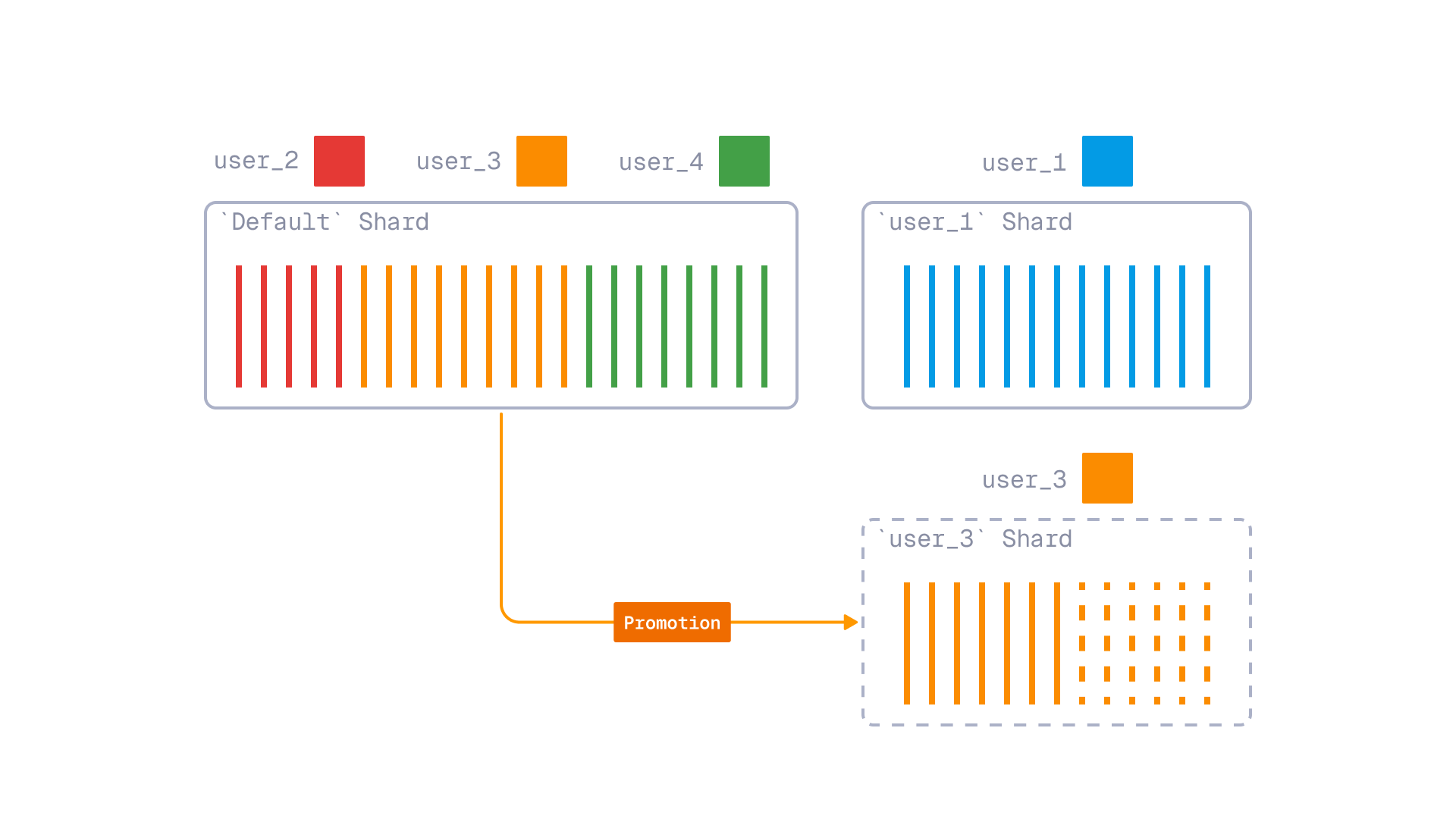
Tiered multitenancy with tenant promotion
To use Tiered Multitenancy, after setting up a collection with a shared fallback shard and dedicated shards, when inserting or querying points, provide a shard key selector.
ACORN - Filtered Vector Search Improvements

To enhance the scalability and speed of vector search, Qdrant employs a graph-based index structure known as HNSW (Hierarchical Navigable Small World). While traditional HNSW is primarily designed for unfiltered searches, Qdrant has addressed this limitation by implementing a filterable HSNW index. This innovative approach extends the HNSW graph with additional edges that correspond to indexed payload values. This enables Qdrant to maintain search quality even with high filtering selectivity, without introducing any runtime overhead during the search process.
Even with filterable HNSW graphs, there are instances where the quality of search results can deteriorate significantly. This can happen when you use a combination of high cardinality filters, leading to the HNSW graph becoming disconnected. It is impractical to build additional links for every possible combination of filters in advance due to the potentially vast number of combinations. Another case where filterable HNSW may break down is in situations where filtering criteria are not known in advance.
To address these limitations, in version 1.16 we are introducing support for ACORN, based on the ACORN-1 algorithm described in the paper ACORN: Performant and Predicate-Agnostic Search Over Vector Embeddings and Structured Data. With ACORN enabled, Qdrant not only traverses direct neighbors (the first hop) in the HNSW graph but also examines neighbors of neighbors (the second hop) if the direct neighbors have been filtered out. This enhancement improves search accuracy at the expense of performance, especially when multiple low-selectivity filters are applied.
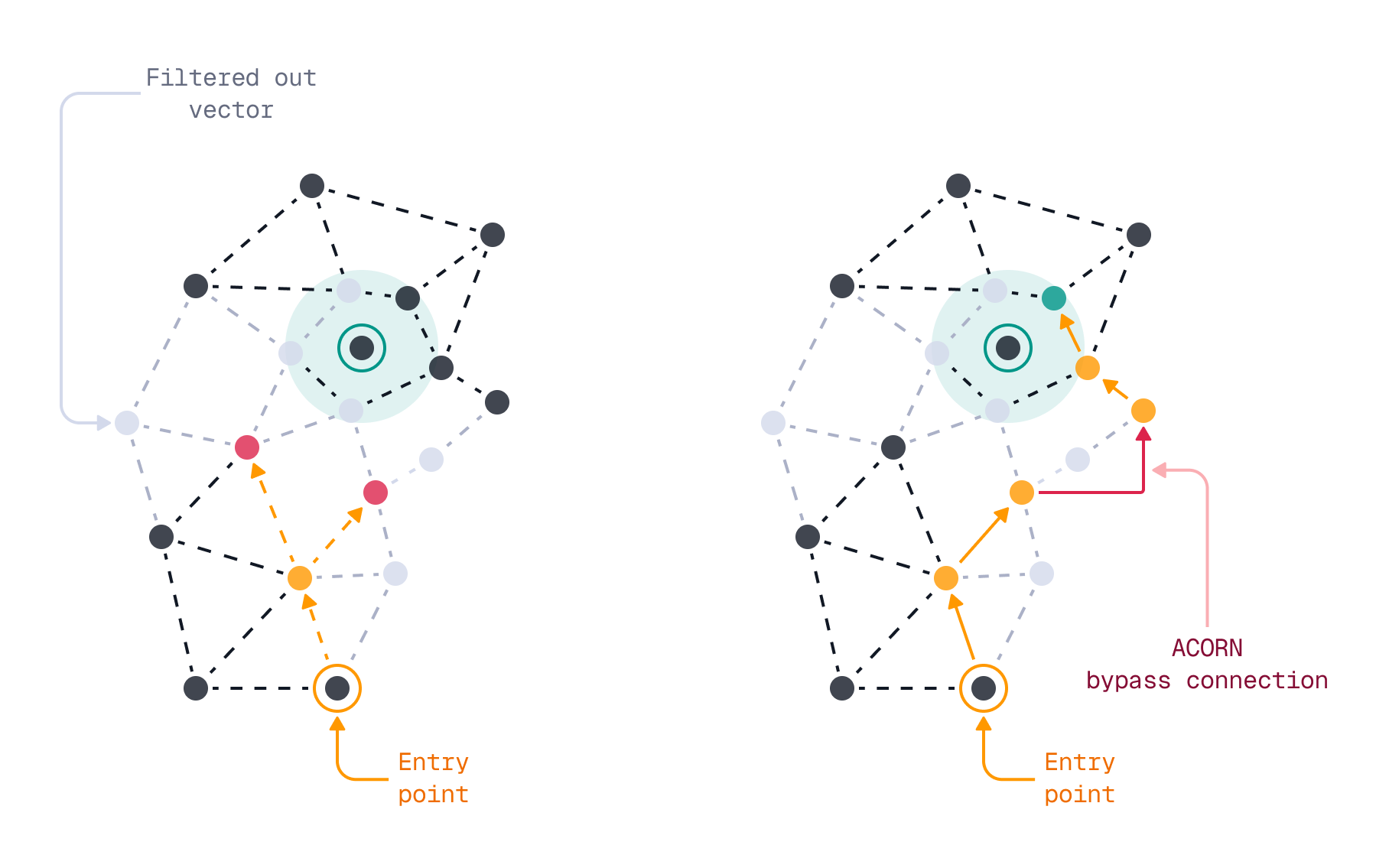
You can enable ACORN on a per-query basis, via the optional query-time acorn parameter. This doesn’t require any changes at index time.
Benchmarks
The setup: a single segment of 5,000,000 vectors of dimension 96 (a subset of deep-image-96 dataset). Two payload fields, each with 5 possible values, uniformly distributed. During the search, we apply two filters on both payload fields, resulting in approximately 4% of vectors passing the filter.
| Search Parameters | Accuracy | Latency |
|---|---|---|
| ef=64 + ACORN | 97.20% | 13.86 ms |
| ef=64 | 53.34% | 1.25 ms |
| ef=128 | 61.77% | 1.46 ms |
| ef=256 | 67.58% | 2.27 ms |
| ef=512 | 71.13% | 3.89 ms |
When Should You Use ACORN?
Enabling ACORN allows Qdrant to explore more nodes within the HNSW graph, which results in the evaluation of a larger number of vectors. This does come with some runtime overhead and should not be enabled on every query.
To help you choose when to use ACORN, refer to the following decision matrix:
| Use case | Use ACORN? | Effect | Impact |
|---|---|---|---|
| No filters | No | HNSW | No overhead |
| Single filter | No | HNSW + payload index | No overhead |
| Multiple filters, high selectivity | No | HNSW + payload index | No overhead |
| Multiple filters, low selectivity | Yes | HNSW + Payload index + ACORN | Some overhead, better quality |
Inline Storage - Disk-efficient Vector Search

Deploying a vector search engine into Production often requires striking a balance between performance and cost. A good example of this trade-off is the decision between RAM-based storage and disk-based storage for the HNSW index. HNSW was designed to be an in-memory index structure. Traversing the HNSW graph involves a lot of random access reads, which is fast in RAM, but slow on disk.
For instance, querying 1 million vectors with the HNSW parameters m set to 16 and ef to 100 requires approximately 1200 vector comparisons. This is fine in RAM, but it is slow on disk, where each random access read can take up to 1ms, or even longer when using HDDs instead of SSDs.
However, disk-based storage has a property we can exploit to reduce the number of random access reads: paged reading. Disk devices typically read a full page (4KB or more) of data at once. Traditional tree-based data structures, such as B-trees, have used this property effectively. However, in graph-based structures like the HNSW index, grouping connected nodes into pages is not straightforward due to each node potentially having an arbitrary number of connections to other nodes.
With Qdrant version 1.16, you can make use of paged reading through a new feature called inline storage. Inline storage allows for storing quantized vector data directly inside the HNSW nodes. This offers faster read access, at the cost of additional storage space.
Inline storage can be enabled by setting a collection’s HNSW configuration inline_storage option to true. It requires quantization to be enabled.
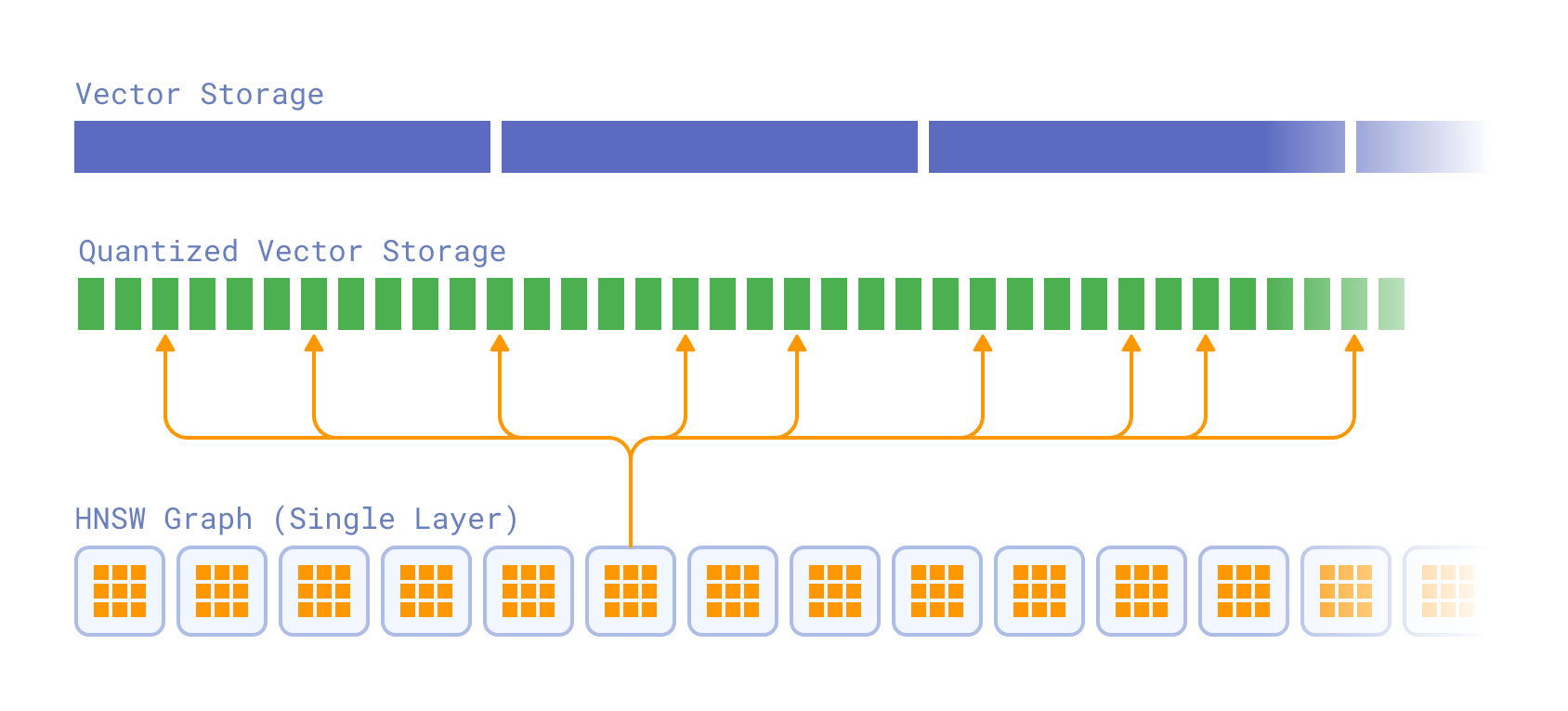
How does it work? During a single iteration of HNSW search, the neighbors of the current node are scored using quantized vectors in order to add them to the search queue. Without inline storage, this results in 1+hnsw_m disk reads.
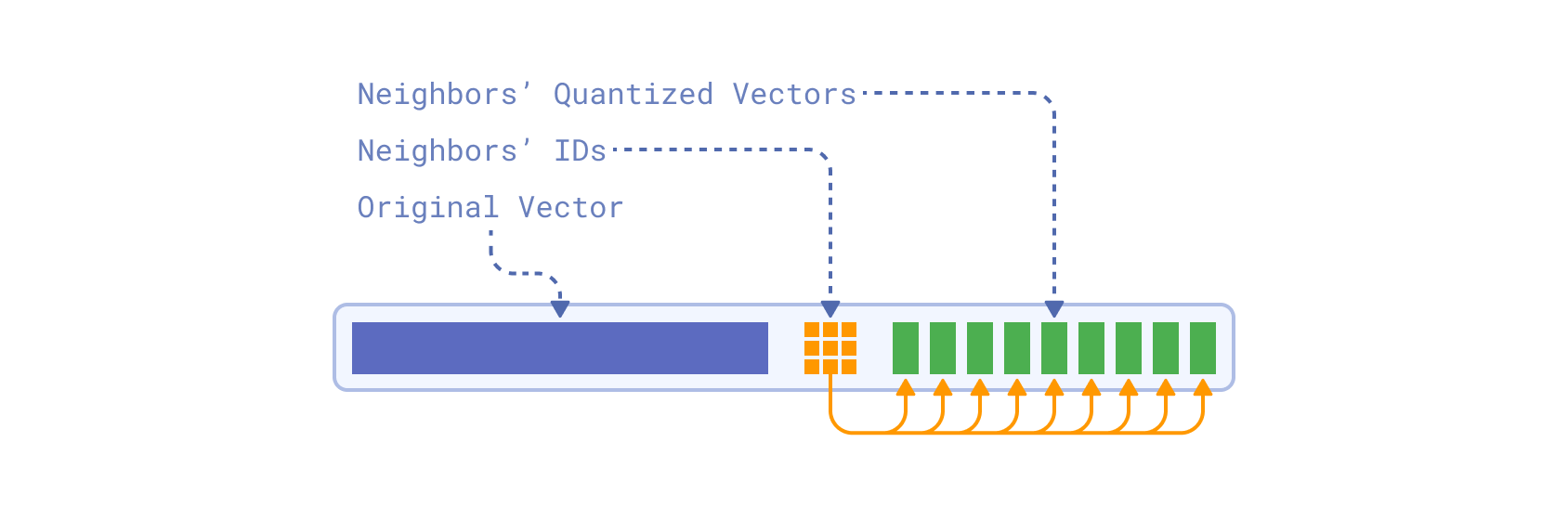
With inline storage enabled, the quantized vectors are directly embedded into the HNSW graph nodes, alongside neighbor IDs. During a single search iteration, both neighbor IDs and their quantized vectors are read from a few consecutive pages, in a single disk read.
Moreover, an original non-quantized vector is also embedded into the same graph node. The original vector is used to perform an implicit rescoring during the search, eliminating the separate rescore step which is usually performed after the search.
Note that quantization needs to be enabled for inline storage to work efficiently. Without quantization, the size of the original vectors would be too large to fit into HNSW nodes. An HNSW graph has M0 = M * 2 = 32 connections per node (by default). If each vector were around 1024 x 4 bytes = 4Kb, each node would need to store M0 x 4Kb = 128Kb. However, each page is only 4Kb.
Using a smaller data type and quantization reduces the size of each vector significantly, making it possible to store them inline. When combining inline storage with float16 data types and quantization, evaluating a node in the HNSW graph requires reading only two pages from disk, rather than making 32 random access reads. This represents a significant improvement over the traditional approach, at the cost of additional storage space.
Benchmarks
Benchmark setup: 1,000,000 vectors (a subset of LAION 512d CLIP embeddings), 2-bit quantization, float16 data type.
| Setup | Container Memory Limit | Total Storage Used | QPS | Mean Accuracy |
|---|---|---|---|---|
| Inline Storage, low RAM (new) | 430 MiB | 4992 MiB | 211 | 86.92% |
| No Inline Storage, low RAM | 430 MiB | 1206 MiB | 20 | 53.32% |
| No Inline Storage, index & quantized vectors in RAM | 530 MiB | 1206 MiB | 334 | 53.32% |
The benchmark shows that the inline storage not just improves search performance by an order of magnitude for low RAM setups, but also provides better accuracy thanks to the implicit rescoring during the search. The search performance is comparable to medium RAM setup which has enough memory to hold HNSW index and quantized vectors in RAM.
Full-Text Search Enhancements

While Qdrant is primarily a vector search engine, many applications require a combination of vector search and traditional full-text search. For that reason, we are continuously enhancing our full-text search capabilities. In version 1.16, we have introduced two new features to improve the full-text search experience in Qdrant.
Match Any Condition for Text Search
Prior to version 1.16, Qdrant supported two ways of searching for multiple search terms in text fields: the text condition that searches for all search terms, and the phrase condition that searches for an exact phrase match.
However, there was no convenient way to search to match at least one of the provided query terms. You would have to tokenize a multi-term query yourself on the client side and build a complex boolean condition with multiple match conditions:
{
  "should": [
    { "match": { "text": "apple" } },
    { "match": { "text": "banana" } },
    { "match": { "text": "cherry" } }
  ]
}
In version 1.16, we have added a new text_any condition that simplifies this use case. Now, instead of building complex boolean conditions, Qdrant can handle the tokenization and matching internally.
The text_any condition matches text fields that contain any of the query terms. In other words, even if a text field contains just one of the query terms, it is considered a match.
{
  "match": {
    "text_any": "apple banana cherry"
  }
}
A good example of using the text_any condition is in e-commerce applications, where users often search for products using multiple keywords. By combining a vector query with a series of increasingly lenient full-text filters, you can ensure that users receive relevant results even if their initial search terms are too restrictive.
QUERY = {
  "text": "best smartphone ever",
  "model": "sentence-transformers/all-MiniLM-L6-v2"
}

batch_query = [
  {
    "query": QUERY,
    "filter": {
      "must": {
        "key": "description",
        "match": { "text": "5G 5000mAh OLED" }
      }
    }
  },
  { # fallback to at least one token
    "query": QUERY,
    "filter": {
      "must": {
        "key": "description",
        "match": { "text_any": "5G 5000mAh OLED" }
      }
    }
  },
  { # fallback to just similarity
    "query": QUERY,
    "filter": null
  }
]
ASCII Folding - Improved Search for Multilingual Texts
Many Latin languages use diacritical marks (accents) to indicate different pronunciations or meanings of letters. For example, the letter “é” in French is pronounced differently from “e” and can change the meaning of a word. Users, when searching for terms with diacritics, may not always include these marks in their queries, which can lead to missed matches.
A solution to this problem is to normalize characters with diacritics to their base ASCII equivalents, a process known as ASCII folding. For example, “café” becomes “cafe” and “naïve” becomes “naive.” This normalization allows for more flexible and inclusive search results, improving search recall for multilingual texts.
An open source contribution by community member eltu has added ASCII folding support to Qdrant’s full-text search capabilities in version 1.16. When enabled, Qdrant automatically normalizes text fields and search terms, for instance by removing diacritical marks.
To enable ASCII folding, set the ascii_folding option to true when creating a full-text payload index.
Conditional Updates

Point updates in Qdrant are idempotent, meaning that applying the same update multiple times has the same effect as applying it once. This can cause issues when two clients attempt to update the same point concurrently, as the last update will overwrite any previous updates. Consider the following sequence of events:
- Client A reads point P.
- Client B reads point P.
- Client A modifies point P and writes it back to Qdrant.
- Client B modifies point P (based on stale data) and writes it back to Qdrant, unintentionally overwriting changes made by Client A.
To address this issue, Qdrant 1.16 introduces support for conditional updates. With conditional updates, you can specify a condition, in the form of an update filter, that must be met for the update to be applied. If the condition is not met, Qdrant rejects the update, preventing unintended overwrites.
For example, you can add a version field to your points to track changes. When updating a point, you can specify a condition that the version field must match the expected value. If another client has modified the point in the meantime and incremented the version, the update is rejected:
PUT /collections/{collection_name}/points
{
    "points": [
        {
            "id": 1,
            "vector": [0.05, 0.61, 0.76, 0.74],
            "payload": {
                "city": "Berlin",
                "price": 1.99,
                "version": 3
            }
        }
    ],
    "update_filter": {
        "must": [
            {
                "key": "version",
                "match": {
                    "value": 2
                }
            }
        ]
    }
}
from qdrant_client import QdrantClient, models

client = QdrantClient(url="http://localhost:6333")

client.upsert(
    collection_name="{collection_name}",
    points=[
        models.PointStruct(
            id=1,
            vector=[0.05, 0.61, 0.76, 0.74],
            payload={
                "city": "Berlin",
                "price": 1.99,
                "version": 3,
            },
        ),
    ],
    update_filter=models.Filter(
        must=[
            models.FieldCondition(
                key="version",
                match=models.MatchValue(value=2),
            ),
        ],
    ),
)
import { QdrantClient } from "@qdrant/js-client-rest";

const client = new QdrantClient({ host: "localhost", port: 6333 });

client.upsert("{collection_name}", {
  points: [
    {
      id: 1,
      vector: [0.05, 0.61, 0.76, 0.74],
      payload: {
        city: "Berlin",
        price: 1.99,
        version: 3
      },
    }
  ],
  update_filter: {
    must: [
      {
        key: "version",
        match: {
          value: 2
        }
      }
    ]
  }
});
use qdrant_client::qdrant::{PointStruct, UpsertPointsBuilder, Filter, Condition};
use qdrant_client::{Payload, Qdrant};
use serde_json::json;

let client = Qdrant::from_url("http://localhost:6334").build()?;

let points = vec![
    PointStruct::new(
        1,
        vec![0.05, 0.61, 0.76, 0.74],
        Payload::try_from(json!({
            "city": "Berlin",
            "price": 1.99,
            "version": 3
        })).unwrap(),
    )
];

client
    .upsert_points(
        UpsertPointsBuilder::new("{collection_name}", points)
            .wait(true)
            .update_filter(Filter::must([Condition::matches("version", 2)]))
    ).await?;
import static io.qdrant.client.ConditionFactory.match;
import static io.qdrant.client.PointIdFactory.id;
import static io.qdrant.client.ValueFactory.value;
import static io.qdrant.client.VectorsFactory.vectors;

import io.qdrant.client.QdrantClient;
import io.qdrant.client.QdrantGrpcClient;
import io.qdrant.client.grpc.Common.Filter;
import io.qdrant.client.grpc.Points.PointStruct;
import io.qdrant.client.grpc.Points.UpsertPoints;
import java.util.Map;

QdrantClient client =
    new QdrantClient(QdrantGrpcClient.newBuilder("localhost", 6334, false).build());

client
    .upsertAsync(
        UpsertPoints.newBuilder()
            .setCollectionName("{collectionName}")
            .addPoints(
                PointStruct.newBuilder()
                    .setId(id(1))
                    .setVectors(vectors(0.05f, 0.61f, 0.76f, 0.74f))
                    .putAllPayload(Map.of("city", value("Berlin"), "price", value(1.99)))
                    .build())
            .setUpdateFilter(Filter.newBuilder().addMust(match("version", 2)).build())
            .build())
    .get();
using Qdrant.Client;
using Qdrant.Client.Grpc;
using static Qdrant.Client.Grpc.Conditions;

var client = new QdrantClient("localhost", 6334);

await client.UpsertAsync(
    collectionName: "{collection_name}",
    points: new List<PointStruct>
    {
        new PointStruct
        {
            Id = 1,
            Vectors = new[] { 0.05f, 0.61f, 0.76f, 0.74f },
            Payload = {
                ["city"] = "Berlin",
                ["price"] = 1.99,
                ["version"] = 3
            }
        }
    },
    updateFilter: Match("version", 2)
);
import (
    "context"

    "github.com/qdrant/go-client/qdrant"
)

client, err := qdrant.NewClient(&qdrant.Config{
    Host: "localhost",
    Port: 6334,
})

client.Upsert(context.Background(), &qdrant.UpsertPoints{
    CollectionName: "{collection_name}",
    Points: []*qdrant.PointStruct{
        {
            Id:      qdrant.NewIDNum(1),
            Vectors: qdrant.NewVectors(0.05, 0.61, 0.76, 0.74),
            Payload: qdrant.NewValueMap(map[string]any{
                "city": "Berlin", "price": 1.99, "version": 3}),
        },
    },
    UpdateFilter: &qdrant.Filter{
        Must: []*qdrant.Condition{
            qdrant.NewMatchInt("version", 2),
        },
    },
})
Note that the name and type of the field used for conditional updates are entirely up to you. Instead of version, applications can use timestamps (assuming synchronized clocks) or any other monotonically increasing value that fits their data model.
This mechanism is particularly useful in scenarios involving embedding model migration, where it is necessary to resolve conflicts between regular application updates and background re-embedding tasks.
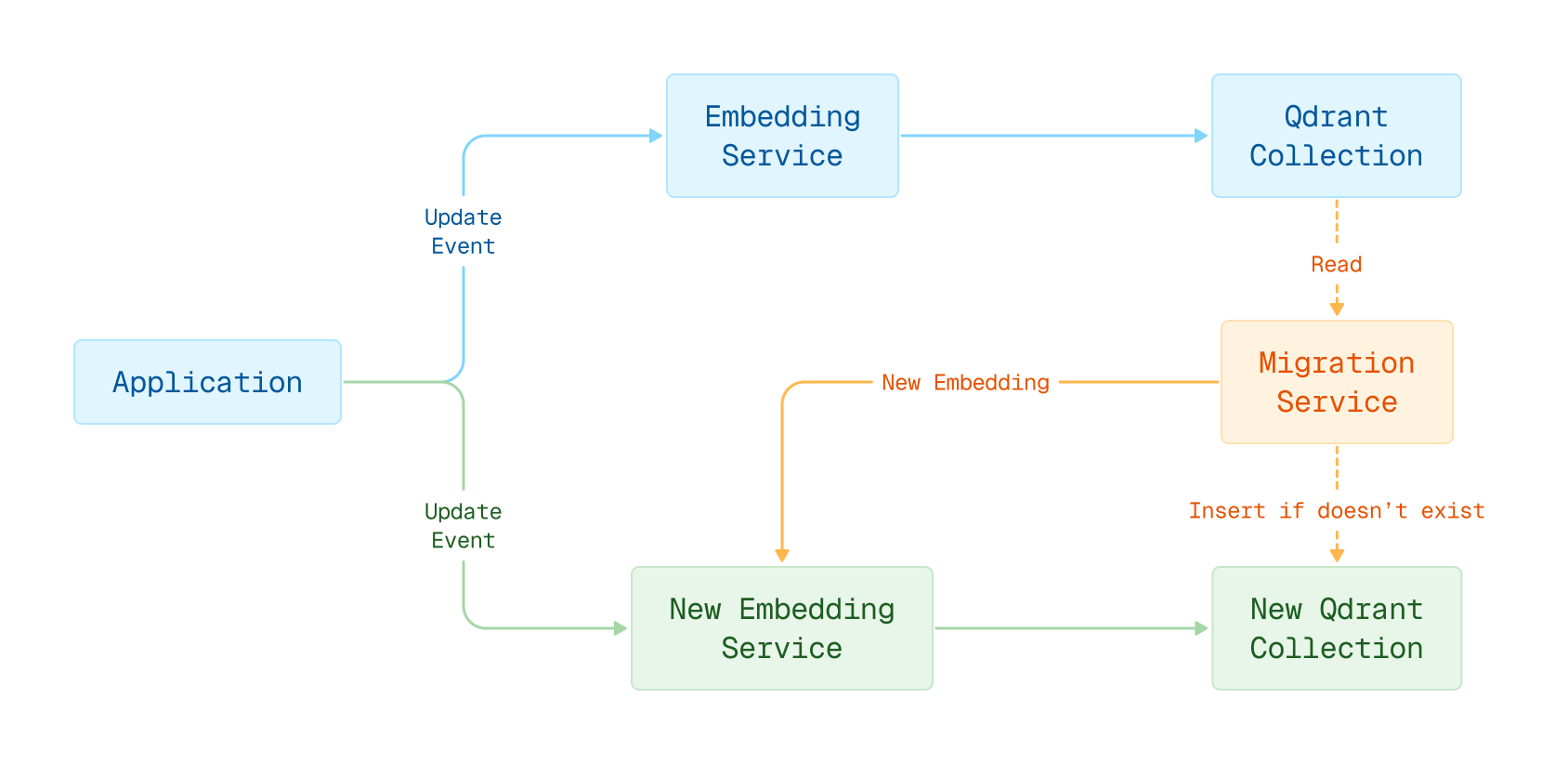
Embedding model migration in blue-green deployment
Web UI Visual Upgrade

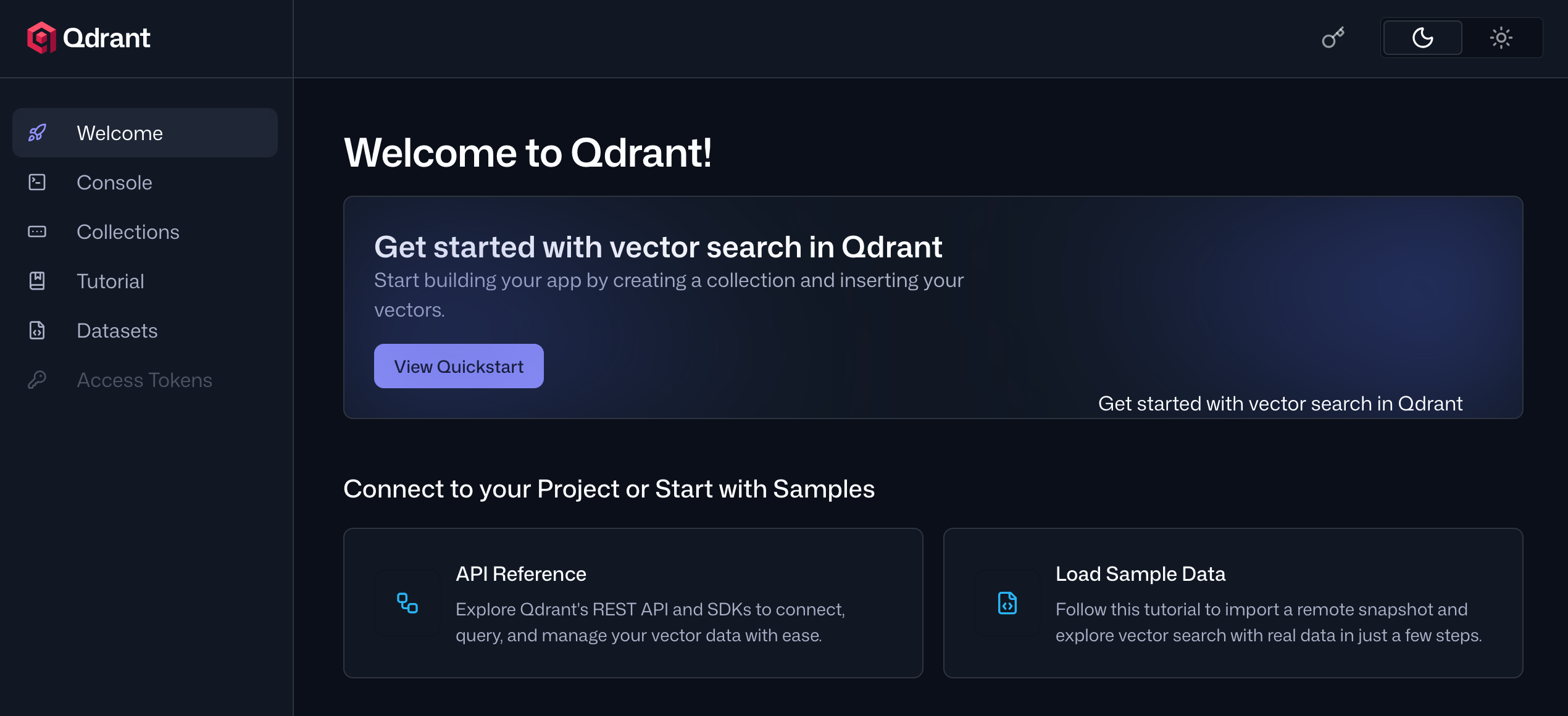
Web UI is Qdrant’s user interface for managing deployments and collections. It enables you to create and manage collections, run API calls, import sample datasets, and learn about Qdrant’s API through interactive tutorials.
In version 1.16, we have revamped the Web UI with a fresh new look and improved user experience. The new design features the following enhancements:
- A new welcome page that offers quick access to tutorials and reference documentation.
- Redesigned Point, Visualize, and Graph views in the Collections manager, making it easier to work with your data by presenting it in a more compact format.
- In the tutorials, code snippets are now executed inline, which frees up screen space for better usability.
Honorable Mentions

- The constant
kthat determines how Reciprocal Rank Fusion (RRF) fuses result sets is now configurable. - The Metrics API now exposes additional metrics that help monitor your deployment’s health.
- In strict mode, it is now possible to configure the maximum number of payload indices.
- It’s now possible to attach custom metadata to collections.
For a full list of all changes in version 1.16, please refer to the change log.
Upgrading to Version 1.16

In Qdrant Cloud, go to your Cluster Details screen and select Version 1.16 from the dropdown. The upgrade may take a few moments.
We recommend upgrading versions one by one, for example, 1.14->1.15->1.16.
There are some minor API changes in version 1.16. Refer to the language client release notes for details.
Engage

We would love to hear your thoughts on this release. If you have any questions or feedback, join our Discord or create an issue on GitHub.